
Home / Creating Sonos Pro
Front of House

Overview
My Role
Lead Designer & Researcher
Team
1 Designer
1 UR Aid (Intern)
1 Product Manager
3 Developers
Timeline
Work Start: Spring 2024
Beta Launch: Spring 2025
GA Launch: Summer 2025
Sonos was built on making music listening easy from home.
As we began to build out Sonos Pro, we quickly realized that the way a traditional consumer manages music at home is vastly different from how businesses and stores manage music.
In 2024, when our roadmap opened up, we embarked on making a tailored control experience for our professional customers, onsite.
Now, baristas or reception staff can use a tool built for them, and admin can set guidelines on how music is played in stores.

Impact
As of Spring 2025
95% of users opted in
After a short demo, current users were very excited to have a new Sonos Pro tool at their disposal.
Sonos + Sonos Pro got an upgrade
In addition to Sonos Pro enhancements, we brought new UI + UX enhancements for all Sonos users.
"This is perfect… I’d use it today”
Post-demo feedback from a Store Manager + Sonos Pro user

Context
In our Sonos Pro Ecosystem, we had two touchpoint for playback control (play pause/music browse):

The Sonos Pro Dashboard being a global-level view and the Sonos Pro app, mainly leveraged for speaker set-up and configuration, as the only touch point for onsite control.
While this worked for our MVP, we received a lot of feedback and churn from customers not able to have a dedicated touch point for onsite staff to control music.
Pain Point 1:
Pro App playback control is tailored to no-restriction listening
In a home, consumers can play any music they choose at any volume.
In a business, admins may want different types of music and volumes throughout the day, and set guidelines to what the store can play.
Pain Point 2:
Pro App has a music browse-centric IA
The Sonos app, like many personal music services (Spotify, Apple Music), lands users primarily around surfacing different music options to play.
However, in businesses, the main use of the app should be around play-back control.
Pain Point 3:
Playback Control, today, is not available on desktop. Management
While the Sonos Pro Dashboard can control music from a desktop, it also surfaces sensitive information that admins don't want to surface to their employees.
While the mobile app works on a phone, businesses wanted playback control in a desktop format, to allow Lighting, POS, and Music in one device.
How might we…
The Outcome
Research
To better understand how businesses use music in-store, I devised a research plan for an on-site control intercept study.
Colleagues between Santa Barbara, Seattle, San Francisco, Chicago, New York, and Boston spent a couple days exploring various businesses, Sonos-users or not, and asked employees and managers how they use music.


Screenshots of Research Guide + Our Explorations of Speakers & Music Management
Iterations
Using our research and understandings, I began iterating through how a restructured IA may be visualized.




User research
From these iterations, I landed on 3 iterations I aimed to put in front of Sonos Pro users, both Admins as well as service staff.
Through our research, we were looking to answer:
Which control model resonates with business owners and employees best to navigate onsite control?
Tabbed Experience
Ideating through 70/30 priority IA between playback control + music browse.
Overlay
Ideating through an IA that replaces traditional MSP hierarchy, with playback control as the first level.
Modified Sonos Web App

Ideating through an enhanced, beta Sonos Web App, offering Sonos Pro functionality.
Path Forward
Ease of use
Ease of implementation
Ease of scale
Modifications still needed
Prioritize playback
Surface appropriate playback controls when needed to allow for easy business functionality.
Access controls
Allow admins to set restrictions and easily lock down or open up playback control and music browse to employees.
Responsive
Pro users primarily use phones, tablets, and desktops to control music.
Access Controls
Now that we were able to land on a touchpoint, we still had an open question on access controls & how admins could add flexible limitations throughout the day.
During our UR, we asked admins how they envision locking devices and to rank the importance of different controls, such as volume, play/pause, queue management, and music browse.
Through this & our guerrilla research, we were able to create 3 goals:
Allow devices to be locked/unlocked locally and independently
Admins onsite should be able to log-in and specify what state a device should be in. However, in businesses, the main use of the app should be around play-back control.
Locking functionality
Features to be restricted include full music browse, browsing only Approved Music, and variations of playback control.
Gate
Device should be able to be locked and unlocked via a PIN unique to each admin.
Access Controls
Exploration
I began with initial explorations, specifically exploring the extent of control options, as well as how to communicate the different modes without requiring extra user clicks.

Initial Explorations
The main principle we looked to follow is a change in settings results in a different view of the locked screen.

Iteration of access controls screen in settings resulting in a locked device.
Through working on iterations with a content designer and recieving feedback from the greater design team, we were able to land on an Experience Milestone 1 (EM1).
Through working on iterations with a content designer and recieving feedback from the greater design team, we were able to land on an Experience Milestone 1 (EM1).
Front of House
EM1 Locked Modes
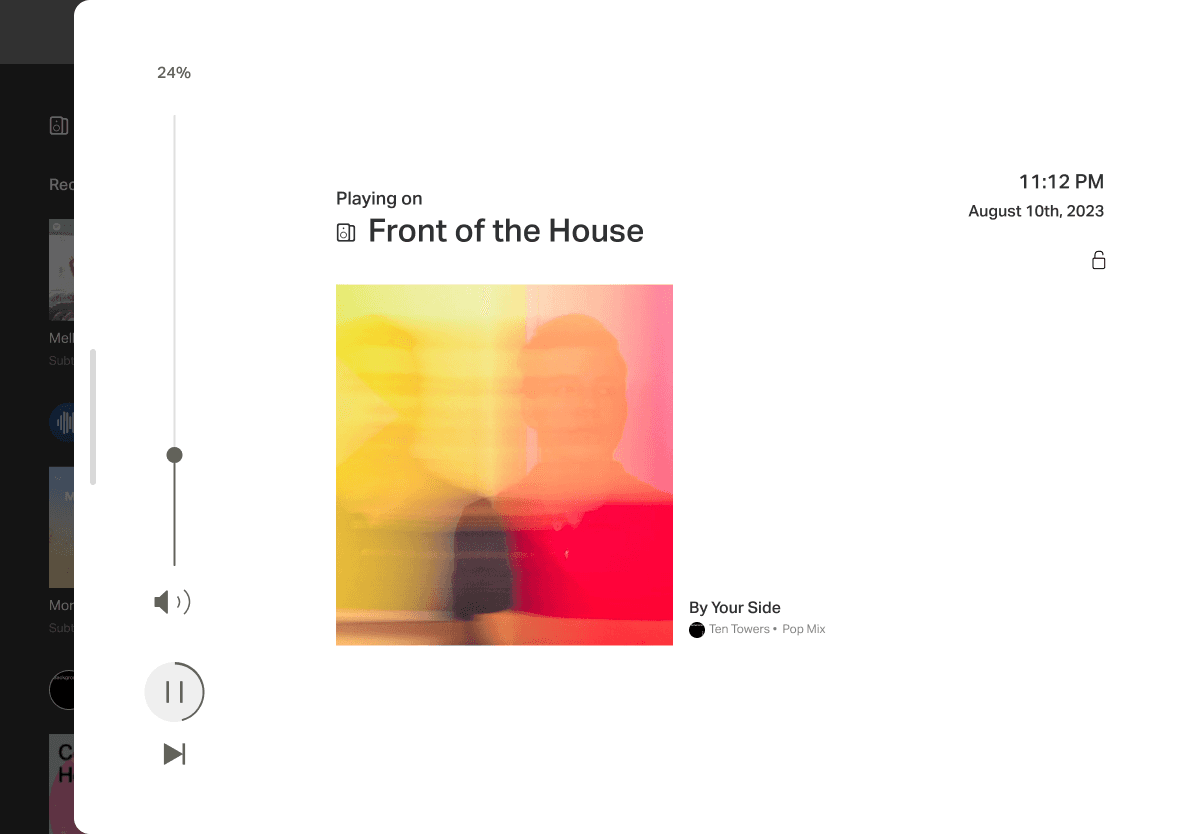
Through 3 different Locked Modes in Settings, Admins could lock their device, behind a pin, to either of the three modes below.
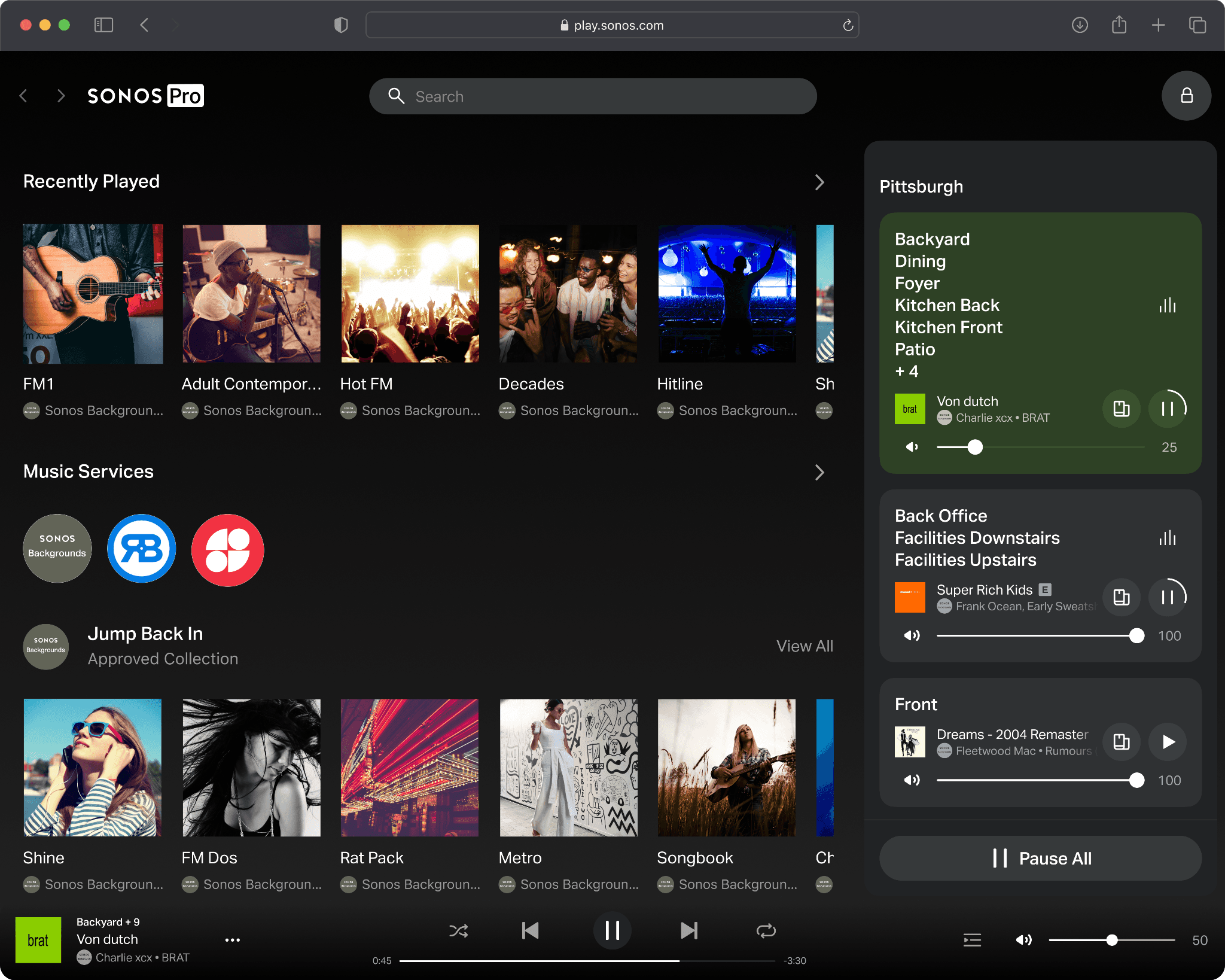
No Locked Mode
Employees can browse and play all music, but not access settings.
Approved Music Only
When locked, employees can only browse Approved Music.

Basic Controls Only
When locked, employees cannot browse music. They can only change volume and access basic playback controls.
Additional Wins
In addition, we were able to bring some additional functionality outside of Locked Modes to allow consumer Sonos Users a better Web experience.
Revitalized Settings
Settings page updated to match new Sonos App for both Pro and consumer.

Responsive
Sonos Web App (Consumer) and FoH are now responsive up to an iPad mini.

Full Now Playing screen
Available to both Pro and Consumer, including all available audio inputs.

Front of House launched in Beta Spring 2025.
95% of current users opted in to join beta.
“This is perfect… I’d use it today”
Next Steps
While I left Sonos shortly before Front of House launched publicly, if I were to continue working on this tool, I would:
Look to Bring Locked Mode settings to the Sonos Pro Dashboard, allowing rulesets to be set globally.
Keep an eye on usage and customer feedback.
This case study does not reflect the full design process and details. For more information, feel free to reach out to learn more about Front of House and my other work building Sonos Pro.